Build story
Shiluv: a room booking system for a clinic
The first system I built for Shiluv clinic: renting out its treatment rooms, with booking from its site, a staff back office and a Google calendar per room.
| First commit | |
|---|---|
| First working version | |
| In production | |
| Commits on main | 490 |
| Test files | 54 |
| Stack | Cloudflare Workers · Supabase · Google Calendar · React · Hono |
I build advanced, custom systems and AI for Shiluv clinic. The room booking system was the first of them, and this page is about that one.
What they needed
Shiluv, a clinic in Ness Ziona, rents out treatment rooms to therapists: five rooms and a community space. Renters booked a room through an outside booking service embedded in the clinic's website, and the staff handled everything else themselves: who rents when, the same therapist's fixed slot every week, requests waiting for approval, and a calendar to keep in sync.
The ask was easy to say and hard to do: renters book on the clinic's own site, the staff see and decide everything in one place, and the data belongs to the clinic rather than to an outside service.
Build first
We didn't wait for a full spec. After a short planning document I built a version that worked, and from then on we talked about what was on the screen. The first commit went in on 17 September, and that same day one booking already went all the way through, from the widget to the staff's screen.
From there, every round started from something you could open and click. The staff tried it, wrote to me about what didn't fit, and I fixed it. That's how we set the latest hour a room can be rented, how the rental terms came to be written in the clinic's own words, and how the widget was redesigned to look right inside the clinic's site and on a phone.
What it does today
Renters get a widget on the clinic's website: pick a day, see which hours are free in which room, and send a request. A therapist the clinic has approved gets a personal link and can book on their own, without waiting for approval.
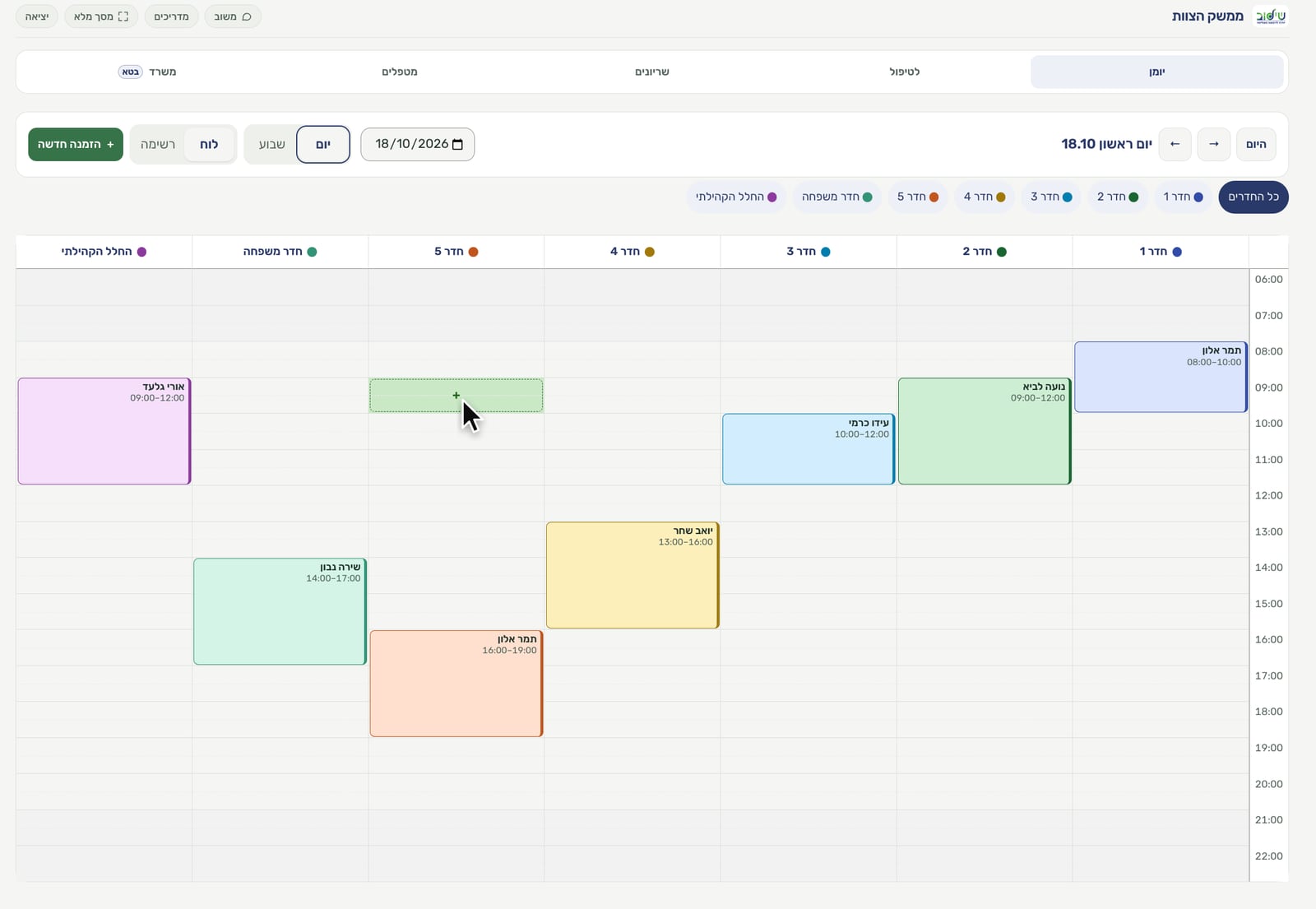
The staff get a back office: a whole day's calendar across every room, bookings, fixed slots that repeat each week, requests waiting for approval, and a tab where they add rooms, edit the text each room shows on the site, and set the order. Signing in takes a code sent to the clinic's email, so there are no passwords to remember.
Each room has its own Google Calendar connected to the system, so anyone used to working from the calendar doesn't have to change their habits.
Twenty short tutorial videos, for renters and for staff, explain every action in the clinic's own language. Inside the system there is a feedback button, so anyone who gets stuck writes to me straight from the screen where it happened.
There is one more layer, less visible: the clinic's Claude can ask the system questions and prepare actions, such as a booking or a cancellation. Every action like that takes two steps: it is prepared first, and then a person approves it explicitly.
Who owns it
The system runs on the clinic's own accounts: the servers, the database and the calendars. I built it; they own it. A nightly backup goes to the clinic's storage, and a separate test environment means every change is checked on dummy data first and only then reaches real renters.
What changed
The system has been live since 29 September, and since 30 September the widget has been on the clinic's website with renters booking through it. Bookings, fixed slots and requests are all managed in one system, on the clinic's accounts.
The room system was the first milestone. We're already working on the next steps, including bringing AI into the clinic's day-to-day work.
What I take from this project: the most useful conversations were about a working version, never about a document. The staff knew exactly what a working day at the clinic looks like, and once there was something to open, they could say what was right and what wasn't. That saved a lot of guessing.